Hikaru's notes
A collection of notes and resources
読みだした理由
- Kubernetes の勉強をした理由
- マイクロサービスで Docker は欠かせない
- AWS での位置づけの個人的な理解だと、Lambda には不可とかパッケージサイズとかが重すぎる処理で採用する
- Lambda にも Docker イメージを使えるが、この関係性は変わらない
- AWS での位置づけの個人的な理解だと、Lambda には不可とかパッケージサイズとかが重すぎる処理で採用する
- Docker のオーケストレーションの OSS?で一番メジャーそう
- AWS だと EKS があるが、マルチクラウドなアーキテクチャで採用できないとか、学習の容易さとかで Kubernetes から勉強するメリットがあると思っている
メモ
- Docker Desktop をインストール
- Docker のライフサイクル
- “Build, Share, Run”
- Build: Dockerfile を使ってイメージを作成
- Share: コンテナレジストリにアップロード
- Run: コンテナレジストリからプルして実行
- “Build, Share, Run”
- Windows 環境だと WSL2 が使える状態になってる必要があった。
- BIOS の SVM みたいな項目を有効にし忘れてた
ためしに nginx を立ち上げてみる
docker run --rm --detach --publish 8080:80 --name web nginx:1.25.3

# 実行結果
Unable to find image 'nginx:1.25.3' locally # ローカルにnginx:1.25.3がないのでpullする
1.25.3: Pulling from library/nginx # nginx:1.25.3をDocker Hubからpullする
a1330b43d726: Pull complete # 各行で1つのレイヤをダウンロードしている。既存のレイヤに新しいレイヤを重ねる感じで開発できるらしい
504c1e01744e: Pull complete
5e8995dba715: Pull complete
330fd09f4306: Pull complete
74a4f808141d: Pull complete
d5181593591e: Pull complete
e1caac4eb9d2: Pull complete
Digest: sha256:c7a6ad68be85142c7fe1089e48faa1e7c7166a194caa9180ddea66345876b9d2
chapter-01\custom-nginx
- Hello world した
- index.html を nginx のデフォルトの index.html に上書きする Dockerfile を作成した
レジストリにアップロードしてみる
- そもそも docker run で参照するのは Docker Hub にアップロードされた Docker Image
- Docker Hub のリポジトリにもプライベートとパブリックを設定できる
- アップロード方法は各レジストリの指示に従う
Docker 公式のベストプラクティスの大事なところだけ
- 機密情報・秘密情報を Docker イメージに書き込まない
- 下のレイヤからは見えるが、上のレイヤからは見えないので、pull した人には丸見え
- 対策としては外部から取得するようにしたり、マルチステージビルドすることで最終成果物から分離する
- マルチステージビルド
【背景】- コンテナに同梱するライブラリ・アプリケーションは最小限にしたい
- 起動・更新にかかる時間も極力短いことが良しとされる 【要約】
- ステージ単位でビルドする
- 最終ステージで各ビルドの成果物をイメージに同梱する
From golang:1.20.5-alpine3.18 as build-env # ビルド環境を指定
WORKDIR /go/src/app # 作業ディレクトリを指定
COPY . . # ソースコードをコンテナにコピー
RUN go build -o myapp # アプリケーションをビルド

FROM alpine:3.18 # 本番環境を指定
COPY --from=build-env /go/src/app/myapp /usr/local/bin/myapp # ビルドしたアプリケーションをコピー
CMD ["myapp"] # アプリケーションを実行するコマンド
- Reconcilation Loop
- 「宣言型」な Kubernetes のリソース管理の考え方
- ※「手続き型」は Ansible とか、全部手順を定義する必要があるのは大変
- Desired State を定義する
- Reconcilation Loop とは、👆 通りになるように自動的に動くこと
- 耐障害性が向上する
- 「宣言型」な Kubernetes のリソース管理の考え方
- マニフェストファイル
簡単なサンプルアプリ起動に必要な知識
- インフラのプロビジョニング
- Desired State を定義する感じ?\
apiVersion: v1
kind: Pod
metadata:
  name: nginx-pod
spec:
  containers:
    - name: nginx
      image: nginx:1.25.3 # nginx のイメージを指定
      resources:
        requests:
          memory: "64Mi" # Podに割り当てるメモリ量
  ports:
    - port: 80 # Podのポート番号
      targetPort: 80 # コンテナのポート番号
      nodePort: 30080 # アプリのポート番号(適当なイフェメラルポートを指定)
-
サーバー(OS)固有の設定が不要なのもありがたい
- Kubernetes のアーキテクチャ(概要)
- Worker Node が Control Plane に問い合わせして環境構築(コンテナを起動する)感じ
- Control Plane に問題が出ても Worker Node 状のコンテナは無事で済む
- Worker Node は単に Node と呼ぶことが多そう
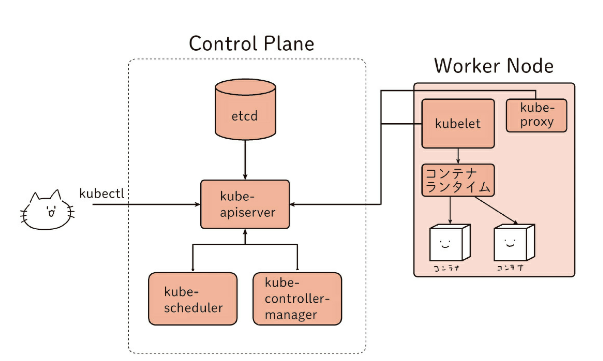
- kubectl
- kubernetes の CLI ツール
- config ファイル
- デフォルトは
~/.kube/configに保存される kubectl config viewで確認できる-
複数個所に保存できて、参照順は 1) –kubeconfig, 2) $KUBECONFIG, 3) ~/.kube/config の順
- デフォルトは
- kind
- DockerHub の kindest/node というリポジトリにあるイメージを簡単に使える
- kindest/node は v1.29.0 が当時の最新
- マニフェスト
- yaml/yml ファイルで定義する
- ファイル名は割と自由?nginx.yaml とかで用途に合わせる
- Pod という概念
- 複数コンテナをまとめて起動できる?
- 典型的なのは、あるサービス A と、A のログを収集するサービス B を同時に起動すること
- この B はサイドカーと呼ばれたりする
- Pod のマニフェストとしてしていできることは API リファレンスがある
- Namespace という概念がある
- Namespace ないではリソース名をユニークにする必要がある
- クラスワイドなリソース(Node とか)は適用範囲外
- default Namespace も用意されているが、商用環境はめったに使わない
- kube-system Namespace は Kubernetes の管理用の Namespace
Manifile 書いて、既存のクラスターに追加する
- ./04/myapp.yaml 書いた
kubectl get pod --namespace defaultで、既存のクラスタがあるか- –namespace default なクラスターに追加したいから
kubectl apply --filename ./04/myapp.yaml --namespace defaultで、追加するkubectl get pod --namespace defaultで、追加されたか確認する- STATUS が Running になってれば OK
参考
docker run的に、kubectl runで Pod を起動することもできるが、あまり使わない- マニフェストから起動できないので、ノードの設定を追いづらい
- Pod の冗長化みたいな高度な設定には
kuberctl apply一択ぽい kubectl runは一時的なPodの起動だと有用- デバッグとかこの本だと後で書いてあるっぽい
トラブルシューティング
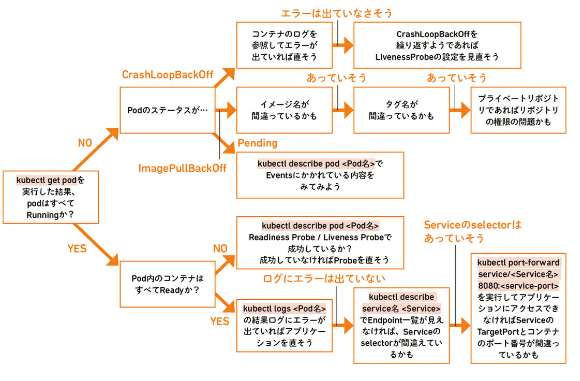
kubectl get pod結果のSTATUS- Pending: 1つ以上のコンテナが準備中。起動中には表示されて当然だが、長時間続いてると怪しい
- Running: Podがノードにスケジュールされている。
- Completed: コンテナが完了した。EC2のTerminatedにあたるやつ?
- Unknown: Podの状態を取得できてない。通信エラーが疑われる
- ErrImagePull: Imageの取得に失敗。
- Error: コンテナが異常終了。Podのログを見る
- OOMKilled: Out of Memory Killed。リソースの見直し
- Terminating: Pod削除中。繰り返すなら設定見直し。
-